Mobile payments make daily life in China convenient, and they also make a printed square of black dots look official even when it is not. Visitors paying with Alipay, WeChat Pay, or a foreign card in restaurants, taxis, scenic sites, and small shops can stay safer with a few boring habits: confirm the payee name on the official app screen before you tap pay, prefer a printed stand that lives at the cashier over a loose sticker on a door or table, and treat unexpected QR codes—especially ones a stranger presses on you—as something to ignore.
This is a practical hygiene guide, not a crime report. It will not invent scam volumes, recovery odds, or a hotline tree. If money has already left the account, use the in-app transaction record and your card issuer, and ask a hotel desk how to reach an official local police station if you need a report. Keep Alipay and WeChat Pay hub handy for ordinary wallet setup so you are not learning the app under pressure.
What a genuine payment usually looks like
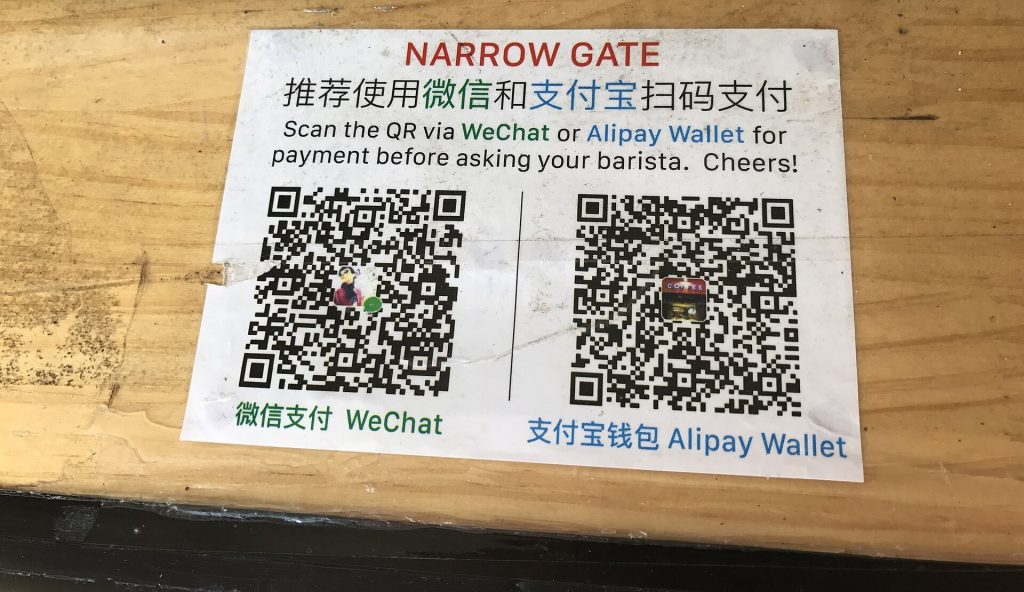
In a restaurant or shop, the ordinary path is a printed QR stand at the counter or on the table, a cashier-presented code, or a request to show your own payment code so staff can scan you. In many places you will also see a card terminal. Street stalls and some scenic-area machines lean more heavily on QR; see paying street vendors that only take a QR code and scenic ticket machines that want WeChat Pay so you are not surprised when a machine prefers a domestic wallet.
Open the official Alipay or WeChat app—the one you installed from a genuine source—and scan the code from inside that app when you can. Read the confirmation screen. It should show a payee name or shop name, an amount you recognise, and a pay button. If the name is a personal account you do not know, if the amount is wrong, or if the screen jumps to a download page, a login you did not request, or a form asking for passwords or verification codes, stop.
Prefer a stand that is clearly part of the till: under glass, behind the cashier, or printed with the shop’s name. Be more cautious with a paper square taped to a street pole, slipped under a plate, stuck on a shared table when another code already sits at the counter, or handed to you by someone who is not taking your order. A second code “because the first one is broken” deserves a check with staff, not an immediate scan.
If you can pay at the register, on a staffed scenic-ticket window, or with a card terminal, that is often simpler than scanning a code you cannot attribute to the business. Cash still solves some small stalls; see why cash is still needed. Self-order kiosks have their own flow—use restaurant self-order kiosks for foreigners and confirm the amount on the kiosk screen before you pay.
Habits that catch most of the awkward cases
Set a payment limit in the official app if the wallet offers one, and enable the official notification so you see a debit immediately. Do not photograph your payment QR and send it to a chat group; that code is a way to request money from you. Do not type card numbers, passport numbers, or SMS codes into a page that opened after a scan if you were only trying to pay for lunch.
Taxis and unofficial offers at airport kerbs need the same pause. Use the official pickup area and the official ride-hailing app when you can, and pay inside that app. A driver who asks you to scan a personal code “for a discount,” or a stranger who says your booking is cancelled and offers a new QR, is asking you to improvise. You can decline and walk back to a signed rank.
Scenic sites, museums, and temporary stalls near holiday crowds attract rushed scanning. If a ticket window is open, use it. If a machine only accepts a wallet you do not have, ask staff for a window, a different official method, or a later return after you fix the wallet—rather than scanning a helper’s personal code “as a favour.”
A short rehearsal helps: make one small official payment after you land, in a shop with a clear cashier, so you know what a normal confirmation screen looks like. Then you will notice when a later screen looks different.
If something already looks wrong, or money has left
Cancel or stay on the confirmation screen rather than pressing pay. If you already paid and the amount or payee looks wrong, keep the official transaction record: screenshot it, do not delete the order, and use the app’s official dispute or customer-service path if one is offered. Call or message your card issuer if a foreign card was charged. Speed matters more than writing a long narrative in a group chat.
A hotel desk can often tell you where the nearest official police station is and may help you describe the situation with a Chinese address. They cannot promise a refund. Do not pay a second time to a “recovery agent” who messages you after the event, and do not scan a new QR that claims to reverse the first payment.
This article will not list official emergency numbers as if they never change, and it will not promise that a report will return the money. It will tell you to stay inside official apps, official bank channels, and official stations.
The rest of a China trip still depends on wallets working well. Set them up carefully with Alipay and WeChat Pay hub, keep a card and a modest cash float, and treat every QR as a request to read a name and an amount—not as a decoration you must obey.
Related Lovely China reading
For payments, start with Alipay and WeChat Pay hub and WeChat Pay vs Alipay for tourists. For trains, keep high-speed rail first-timers guide and 12306 passport signup for foreigners handy. City hubs: Beijing first-visit guide, Shanghai first-visit guide. Connectivity: roaming vs local SIM honest guide, pocket Wi-Fi vs eSIM for China, offline maps for foreigners. Bookmark China travel tools page.
Practical checklist
- Confirm official rules on the relevant government, park, airline, or bank page near your travel week
- Screenshot bookings, tickets, and QR codes while you still have stable Wi-Fi
- Save hotel and attraction names in Chinese characters in your phone notes
- Carry passport, a backup payment method, and a small cash float (why cash is still needed)
- Test one small mobile payment before you rely on wallets at a gate or taxi
- Keep China travel tools page bookmarked for related Lovely China hubs
FAQ
What should I check before I tap pay on a QR code?
Read the official app confirmation screen: payee name, amount, and that you are still inside Alipay or WeChat Pay. If the name is a personal account you do not know, the amount is wrong, or the page jumps to a download or password form, stop.
Is a sticker on a table as safe as the stand at the cashier?
Prefer a printed stand that is clearly part of the till. Be cautious with a loose paper square on a door, a second code “because the first is broken,” or a code a stranger hands you. Ask staff, or pay at the register.
What should I do if money has already left the account?
Keep the official in-app transaction record, contact your card issuer if a foreign card was charged, and ask a hotel desk how to reach an official local police station if you need a report. Do not scan a new QR that claims to reverse the payment.
Notes for late 2026 travellers
Late December 2026 and the New Year week into 2027 bring colder mornings, earlier sunsets, and holiday crowds in many city hubs. Pack real winter layers in the north, and leave extra time on weekends and around 1 January.
This article does not invent ticket prices, opening hours, processing times, consular fees, or official statistics. When a number matters, verify it on the official site, app screen, or ticket board near your travel week.
If an official rule page disagrees with this guide, follow the official page. Lovely China orients English-speaking travellers; we are not an immigration, banking, or medical authority.