Navigating digital payments in China as an international traveler or expat comes down to mastering two distinct directions of QR code transactions: scanning a merchant’s code with your phone, or having a cashier scan your dynamic payment code. Getting this wrong at a busy checkout counter can stall the queue, trigger foreign-card errors, or cause confusion.
Whether you are exploring bustling night markets this November or December 2026, understanding how WeChat Pay handles both flows ensures seamless transactions across everything from major retail chains to independent street stalls.
The Two Core Payment Flows in WeChat Pay
When paying with WeChat Pay, transactions generally follow one of two paths. Knowing when to use each method prevents awkward checkout delays.
Method 1: You Scan the Merchant’s Code (Merchant Scan)
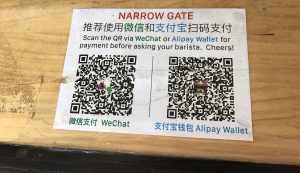
How it works: You open WeChat, tap Scan, and point your camera at a QR code displayed on a counter, sticker, or table-ordering plaque. You then manually enter the purchase amount in Renminbi (RMB) and tap confirm.
Where it happens: Sit-down restaurants, independent coffee shops, fruit vendors, taxis, and small neighborhood shops.
Foreign-card friction note: If you link an international Visa, Mastercard, or American Express card, scanning a personal peer-to-peer QR code (frequently used by micro-vendors) may occasionally trigger a restriction error. Stick to registered business or merchant codes. For deep-dive troubleshooting on international funding sources, review the WeChat Pay foreign card guide.
Method 2: The Merchant Scans Your Pay Code (Your Pay Code)
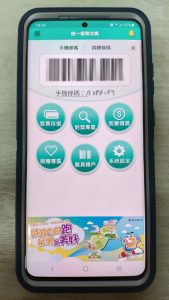
How it works: You open WeChat, tap Pay (or Services > Wallet > Payment Code), and present a dynamic barcode and QR code on your screen. The cashier scans your screen using a handheld terminal or counter scanner.
Where it happens: Supermarkets, convenience stores like FamilyMart or 7-Eleven, major retail chains, hotel desks, and subway ticket counters.
Foreign-card friction note: This method routes smoothly through your bound foreign credit or debit card at almost all formal retail outlets. It is often faster because the cashier’s hardware handles the exact pricing automatically, minimizing input mistakes.
Screen Brightness, Lock-Screen Tips, and Security
When a cashier needs to scan your phone code, environmental factors and app security features can sometimes cause unexpected delays.
Maximize screen brightness: Retail scanners struggle to read screens dipped in low brightness or covered by heavy, matte screen protectors. Turn your display brightness up manually before stepping to the front of the queue.
Never screenshot your pay code: Your WeChat payment code is dynamic and refreshes every few minutes for security. Static screenshots will be rejected instantly by point-of-sale scanners.
Watch out for transfer confusion: Ensure you are opening the Payment Code screen rather than the “Receive Money” (收款) screen. Showing a receive code prompts the cashier to pay you, which creates immediate confusion. If you encounter broader limitations regarding daily transaction caps or frequency, check the details on WeChat Pay QR scan limits tourists.
Managing Split Bills and Small Vendors
Handling group dining or micro-transactions requires a strategic approach when using foreign-linked wallets.
Split bills mindset: In modern Chinese restaurants, table-ordering mini programs often allow individual diners to pay their exact share independently. If a single bill is paid upfront by one person, use WeChat’s built-in group transfer or digital red packet features to settle up, keeping in mind that peer-to-peer transfers from foreign cards can face platform restrictions. For broader context on local customs, see tipping in China for foreigners—tipping is neither expected nor practiced.
Small vendors vs. large chains: Chains have robust merchant setups that accept foreign-backed QR scans seamlessly. Independent street food stalls using simple paper codes can occasionally reject foreign-card funding routes.
The cash backup: Always carry physical RMB notes (such as ¥50 and ¥100 bills alongside smaller denominations) as an infallible backup. If a digital payment fails due to connectivity drops or card verification hurdles, cash is legally accepted and solves the problem instantly. To compare ecosystems or set up alternative apps, consult the Alipay and WeChat Pay hub and Alipay setup for foreigners. You can also evaluate platform nuances directly via WeChat Pay vs Alipay for tourists.
FAQ
Why did my WeChat Pay transaction get declined when scanning a small shop’s code?
You likely scanned a personal peer-to-peer transfer code rather than a registered commercial merchant code. Personal codes restrictedly process domestic Chinese bank accounts and frequently reject foreign-issued cards. Switch to showing your own payment code for the vendor to scan, or pay with physical cash.
Should I use WeChat Pay or Alipay for merchant-scan transactions?
Both apps function similarly, but keeping both active gives you a vital fallback. If a merchant scan fails or loads slowly in WeChat Pay, opening Alipay and trying the alternative flow often resolves the issue immediately.
How do I verify the amount before confirming a merchant scan?
When you scan a merchant code, your app prompts you to manually type the total amount in RMB. Always double-check the bill or the cash register display against your phone screen before entering your six-digit payment PIN or confirming with biometrics. Never rush this step.
Do I need internet data to show my payment code?
Yes. Both WeChat Pay and Alipay require an active cellular data connection or stable Wi-Fi to generate a fresh, secure dynamic payment code and authorize transactions through your foreign card. Ensure your travel eSIM or roaming plan is active before heading out.
Related Lovely China reading
For payments, start with Alipay and WeChat Pay hub and WeChat Pay vs Alipay for tourists. For trains, keep high-speed rail first-timers guide and 12306 passport signup for foreigners handy. City hubs: Beijing first-visit guide, Shanghai first-visit guide. Connectivity: roaming vs local SIM honest guide, pocket Wi-Fi vs eSIM for China, offline maps for foreigners. Bookmark China travel tools page.
Practical checklist
- Confirm official rules on the relevant government, park, airline, or bank page near your travel week
- Screenshot bookings, tickets, and QR codes while you still have stable Wi-Fi
- Save hotel and attraction names in Chinese characters in your phone notes
- Carry passport, a backup payment method, and a small cash float (why cash is still needed)
- Test one small mobile payment before you rely on wallets at a gate or taxi
- Keep the China travel tools page page bookmarked for related Lovely China hubs
FAQ
Is this people advice official?
No. Lovely China orients travellers. Verify live rules on official pages, apps, and counters near your travel week.
Will every city behave the same?
No. Airports, stations, parks, and markets differ. Use local signage and staff instructions when they conflict with a general guide.
What should I screenshot before I lose Wi-Fi?
Bookings, tickets, hotel Chinese address, pickup pins, and payment success screens.
Notes for late 2026 travellers
November and early December bring cooler mornings, earlier sunsets, and comfortable walking weather across much of eastern and central China. Pack layers and leave extra time on clear weekends at popular sights.
This article does not invent ticket prices, opening hours, processing times, consular fees, or official statistics. When a number matters, verify it on the official site, app screen, or ticket board near your travel week.
If an official rule page disagrees with this guide, follow the official page. Lovely China orients English-speaking travellers; we are not an immigration, banking, or medical authority.