Why shared power banks matter for visitors
Chinese cities run on phones: metro QR codes, Alipay and WeChat Pay, maps, translation, and ride-hail. A dead battery is not a minor inconvenience — it can strand you at a metro gate or leave you unable to show a hotel booking. Shared rental power banks (共享充电宝) sit in kiosks at malls, subway exits, restaurants, convenience stores, and tourist sites. For many locals, renting one for a few hours is as normal as borrowing a shared bike.
This guide is for English-speaking travellers and expats who need a calm first rental: how the kiosks work, what apps usually ask for, how deposits and return rules feel in practice, and when you should skip the machine and use a wall charger instead. It does not invent prices or brand rankings — those change by city and kiosk. Always read the on-screen terms for the cabinet in front of you.
What you will see: the kiosk, not a shop counter
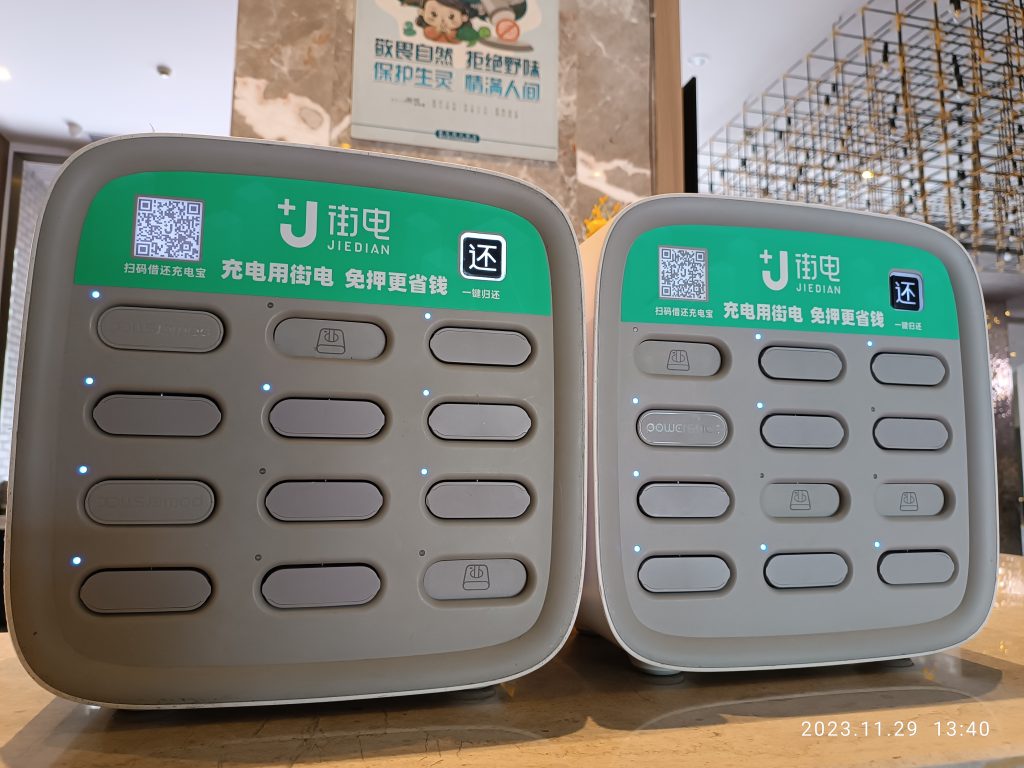
Look for a tall or wall-mounted cabinet with rows of rectangular battery packs, each with a short cable tip or a cable choice on the pack. Brands vary by city and venue. Screens usually show a QR code, a map of nearby return points, and bilingual or Chinese-only instructions. You unlock a pack by scanning with a payment app, carry it while it charges your phone, then push it back into any compatible cabinet from the same network when finished.
Practical first impressions:
- Cabinets cluster where people wait — food courts, cinema lobbies, attraction exits.
- Some packs include a short cable; others expect you to use your own cable with a USB-A or USB-C port on the pack. Check before you walk away.
- Indicator lights show remaining charge; pick a pack that looks full enough for your next few hours.
- Not every restaurant has a kiosk. Do not assume the next block will.
Before you try a rental: payments, phone, and a backup plan
Most rentals are app-driven. Foreign visitors who already use Alipay or WeChat Pay have the smoothest path because many cabinets open inside those ecosystems. If your payment apps are not ready yet, complete that setup first — see the Alipay/WeChat visitor guide linked above — rather than troubleshooting a deposit at a crowded mall entrance.
Also prepare:
- Your own cable as backup if the pack’s tip does not fit your phone.
- Hotel Wi-Fi or a working SIM so the app can load maps of return points — China SIM and eSIM notes.
- A wall-outlet plan at your hotel if the rental flow fails. Hotel rooms remain the most reliable overnight charge; see hotel check-in with a foreign passport only for registration — charging is usually just a desk socket.
If you cannot complete identity or deposit steps the app requests, stop. Do not hand your passport to a stranger offering to “help unlock” a kiosk.
Step-by-step: a typical first rental
Exact screens differ by brand, but the flow is usually:
1. Open Alipay or WeChat and use the scan function on the kiosk QR code (or open the brand mini-program the screen names).
2. Grant the location or payment permissions the app requests only if you understand them; cancel if the language is unclear and you are uncomfortable.
3. Review the on-screen rental rules: billing unit (often timed), free return window if any, and deposit hold language.
4. Choose a pack slot; wait for the door or eject mechanism.
5. Confirm your phone begins charging before you leave the cabinet area.
6. Keep the app order page open or screenshot the return instructions and customer service entry.
While you carry the pack:
- Put it in a zip pocket — do not leave it on café tables unattended.
- Avoid extreme heat (dashboard of a car in sun) and rain exposure.
- Do not force incompatible cables into ports.
Returning the pack without panic
Return means inserting the pack into a compatible cabinet until the app confirms success. Compatible usually means the same brand network — not every yellow or white box in the city. Use the app map to find a return point near your next meal or metro exit.
Return tips that prevent fees and stress:
- Return before you enter a long museum security line if the pack is not allowed inside.
- Listen or watch for the cabinet confirmation; if the app still shows “renting,” try reseating the pack or choose another empty slot.
- Do not abandon a pack in a hotel drawer. That is how deposits become problems.
- If a cabinet is full, walk to the next mapped point rather than leaving the pack on top of the machine.
If the app cannot close the order, use the in-app customer service entry and stay at the cabinet while you message — photos of the cabinet ID help support staff.
Deposits, billing, and what visitors should double-check
Shared power banks typically combine a deposit hold with timed rental billing. Exact amounts change; this guide will not invent a number. Read the screen for:
- How long a free or low-cost initial period lasts, if any.
- When billing steps up (per half-hour or per hour is common language on screens).
- What happens if you keep the pack past a daily cap — some networks convert long holds into a purchase-like charge.
- Whether the deposit returns automatically to the same payment method after a successful return.
Foreign cards linked through Alipay/WeChat sometimes release holds on a delay. If a hold remains after a confirmed return, check the app’s order history first, then the payment method statement, before assuming a permanent charge. Keep screenshots of the completed return.
When you should skip the kiosk
Skip shared rentals when:
- You cannot finish the app or deposit flow in a language you understand.
- You are about to board a long train and cannot confirm a return point at the destination brand network.
- Security at an attraction forbids power banks in certain bag checks (follow staff rules that day).
- Your phone is already critically low and the nearest cabinet queue is long — ask a restaurant for a wall socket instead, or return to the hotel.
Carrying your own compact power bank from home remains valid. Airline rules for spare lithium batteries still apply in carry-on; follow your carrier’s published guidance. Shared city rentals are a convenience layer, not a requirement.
Holiday timing: Mid-Autumn and Golden Week 2026
Phone dependence rises when crowds rise. Around Mid-Autumn Festival (Friday 25 September 2026, roughly 25–27 September; makeup workday Sunday 20 September) and Golden Week (1–7 October 2026; makeup workday Saturday 10 October per 国办发明电〔2025〕7号), expect:
- Longer queues at mall and attraction kiosks.
- More “empty cabinet” moments at peak photo spots.
- Heavier metro and map use — charge before you leave the hotel each morning.
For wider holiday pacing, see Golden Week 2026 vs Mid-Autumn. Pair power planning with transport planning: train tickets on 12306 for visitors and ride-hail via Didi both need a living phone.
City manners and safety basics
- Do not block shop entrances while wrestling with an app — step aside.
- Return packs intact; do not remove labels or force open casings.
- Ignore unofficial “helpers” who want to scan using their own phone.
- Keep volume low on video calls in quiet metro cars while your pack charges.
- If a pack feels abnormally hot, stop using it and return it as faulty via the app if possible.
A simple visitor checklist
- Payment app ready before you need a rental.
- Own cable in the bag as backup.
- Screenshot hotel address and metro exits while battery is healthy.
- Charge overnight at the hotel; rent only for daytime gaps.
- Return to a mapped same-brand cabinet; confirm the order closes.
- Skip the kiosk if deposit or language steps feel unclear.
Final tip
Shared power banks are everyday infrastructure in Chinese cities — useful, app-shaped, and easy once you complete one calm rental. They are not magic: a wall charger at the hotel still wins for overnight, and a failed deposit flow means walk away, not force it. Keep Mid-Autumn and Golden Week days shorter so your phone (and your feet) last. For payment setup, start with Alipay and WeChat Pay for foreign visitors. Questions: [email protected]. Lovely China was founded in 2025.