A China trip is easier when your Android phone can keep a home number—or a home eSIM—and still add a travel eSIM or a physical SIM that works after you land. This is a device-setup guide for official Android phones: Pixel, Samsung, and other devices that use an official manufacturer skin. It is the Android companion to iPhone dual-SIM and eSIM setup for China, not a copy of that article, and it is not a lesson in unofficial firmware, unlocking, or unofficial workarounds.
Use official Settings, official carrier apps or official QR installation flows, and your device maker’s eSIM help pages. This article will not invent a model-by-model compatibility list or a price table. Before you change anything, check that your specific phone officially supports eSIM or dual SIM the way you hope to use it.
Check the phone you actually own
On a recent official Pixel or Samsung device, look in official Settings for SIMs, SIM manager, or a similarly named network page. You should be able to see whether a physical tray is present, whether an eSIM is already installed, and whether the maker documents a second SIM or eSIM slot. If the page is missing, or if your device is a single-SIM model, do not assume a blog can add a slot. Read the manufacturer’s support page for your exact model.
Dual SIM on Android often means one physical SIM plus one eSIM, or two eSIMs, or two physical SIMs, depending on the device. The combination matters. If you want to keep a home number reachable for bank SMS, you need a plan that still receives those messages on the SIM you keep, and a data path for maps and wallets in China. roaming vs local SIM honest guide is the honest comparison between roaming and a local or travel SIM; this article is about fitting that choice onto the phone.
If your phone is carrier-locked, an official travel eSIM or a Chinese physical SIM may not install until the lock is removed through official carrier channels at home. Do not follow unofficial “unlock” instructions. If a work phone is managed by an employer, ask IT before you add a second line.
Download the official apps you actually need before you fly, while you still have ordinary home connectivity. essential apps for foreigners explains the usual set. Honesty about apps that may be awkward to download after landing is useful; describing tools to bypass restrictions is not part of this guide.
Add a travel eSIM without losing the home line
If you choose a travel eSIM, buy it from a provider you recognise, and install it with the official QR or official app flow your phone supports. Many travellers install the eSIM before departure but leave it off until they land, so the home line remains the default in the air. Follow the provider’s official activation steps and the phone’s official SIM manager: label the lines clearly (“Home” and “China travel”), set which line is used for data, and decide which line may still receive calls and SMS.
If activation should wait until you are in China, read the provider’s official instruction so you are not turning the profile on too early or too late. If it will not come online after landing, eSIM will not activate after landing is the troubleshooting companion; start with airplane mode off, official roaming or data toggles as the provider describes, and a restart, not with random third-party “repair” apps.
Keep the home eSIM or physical SIM enabled for SMS if you still need bank or airline codes, unless your provider and phone setup cannot do that at the same time. Test a code-receiving path at home before you travel if your bank depends on SMS. For tourist SIMs bought after landing, eSIM airport pickup vs ship-to-hotel and buy SIM passport carrier store cover pickup versus a carrier store with a passport.
When two lines are active, set data to the travel line for maps, ride-hailing, and wallets, and confirm that the home line is not quietly using expensive data roaming. Official Settings usually let you pick a default data SIM and disable data roaming on the home line. Check those toggles twice: once when you install, and once after you land.
Physical SIM, trays, and a calm install
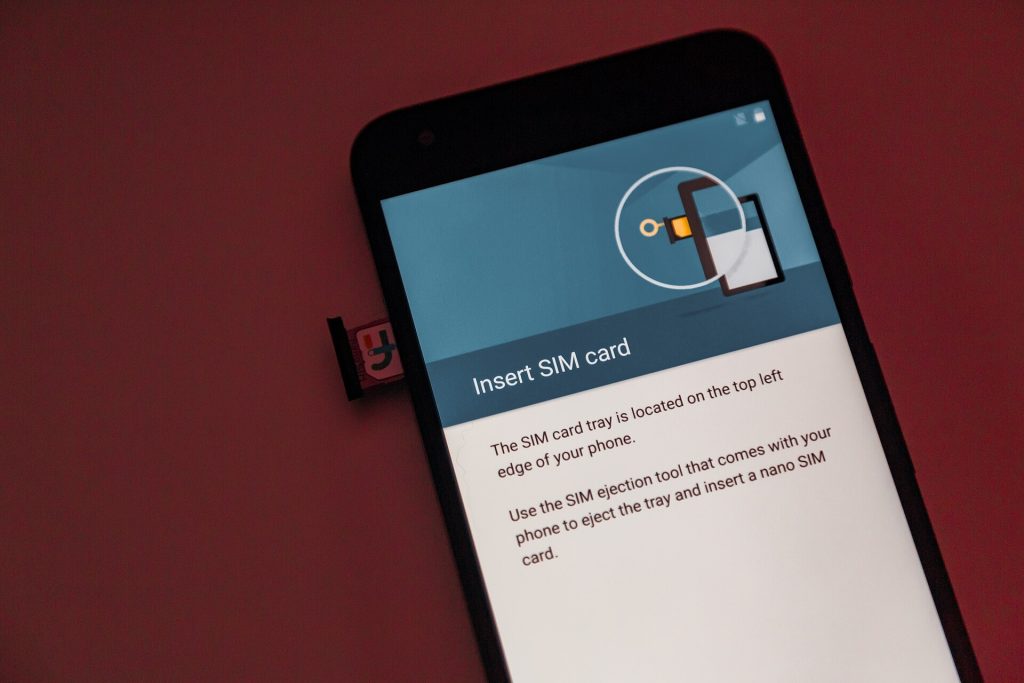
If you prefer a physical Chinese SIM, look at the tray before you leave home. Some phones use a hybrid tray in which a second physical SIM replaces a memory card. Photograph the tray layout. Use the official ejector tool, not a random pin that might slip. Swap in a quiet hotel room or a staffed carrier counter, not in a crowded arrivals hall with one free hand and a suitcase.
Enter the official PIN if the new SIM asks for one, and give the phone a minute to find the network. If it does not, confirm you placed the SIM in the correct side of the tray, then ask the official store or official provider support—not a stranger at a kiosk who wants to “flash” the phone.
Leave the home SIM in the other slot if your device supports it and if that is your plan for SMS. If the phone will only accept one physical SIM, decide in advance whether the home SIM stays in a labelled sleeve in your luggage so you can restore it on the way home.
After landing, confirm data and a small payment
Open Settings and confirm the travel line has data, that the home line is not roaming data accidentally, and that Wi-Fi calling or similar features are in a state you understand from the official help pages. Then test a map pin, a wallet, and one small official payment. If data is absent, official airport Wi-Fi may cover the next hour while you deal with the provider; do not treat a failed eSIM as a reason to install unofficial software.
This setup should feel boring: official settings, official profiles, labelled lines, and a backup plan if a QR will not install. Keep the manufacturer’s eSIM page bookmarked, keep your provider’s official support path, and keep the home SIM safe. The goal is a phone that still receives a bank code and can still open a map—not a modified device.
Related Lovely China reading
For payments, start with Alipay and WeChat Pay hub and WeChat Pay vs Alipay for tourists. For trains, keep high-speed rail first-timers guide and 12306 passport signup for foreigners handy. City hubs: Beijing first-visit guide, Shanghai first-visit guide. Connectivity: roaming vs local SIM honest guide, pocket Wi-Fi vs eSIM for China, offline maps for foreigners. Bookmark China travel tools page.
Practical checklist
- Confirm official rules on the relevant government, park, airline, or bank page near your travel week
- Screenshot bookings, tickets, and QR codes while you still have stable Wi-Fi
- Save hotel and attraction names in Chinese characters in your phone notes
- Carry passport, a backup payment method, and a small cash float (why cash is still needed)
- Test one small mobile payment before you rely on wallets at a gate or taxi
- Keep China travel tools page bookmarked for related Lovely China hubs
FAQ
Will every Android phone support a travel eSIM plus a home number?
No. Check official Settings and your device maker’s eSIM help for your exact model. Combinations vary: one physical SIM plus one eSIM, two eSIMs, or a hybrid tray. This article does not invent a model list.
Can I follow unofficial unlock or firmware instructions if my phone is locked?
No. Use official carrier unlock channels and official Settings only. Do not install unofficial software to add a line or to change how the phone reaches the internet.
When should I turn the travel eSIM on?
Follow the provider’s official activation steps. Many travellers install the profile before departure and leave it off until they land, then set data to the travel line and disable data roaming on the home line. If it will not come online, use official troubleshooting, not a third-party “repair” app.
Notes for late 2026 travellers
Late December 2026 and the New Year week into 2027 bring colder mornings, earlier sunsets, and holiday crowds in many city hubs. Pack real winter layers in the north, and leave extra time on weekends and around 1 January.
This article does not invent ticket prices, opening hours, processing times, consular fees, or official statistics. When a number matters, verify it on the official site, app screen, or ticket board near your travel week.
If an official rule page disagrees with this guide, follow the official page. Lovely China orients English-speaking travellers; we are not an immigration, banking, or medical authority.