The laminated menu is often gone
In many Chinese cities, the first thing on your restaurant table is not a paper booklet—it is a QR code stuck to a stand, under glass, or printed on a disposable placemat. Scanning it opens a mobile menu: photos, categories, cart, and checkout. For locals with WeChat or Alipay already linked to a phone number and bank card, the loop is muscle memory. For foreign visitors, it can feel like a locked door with a friendly waiter watching.
This guide walks through the calm path: how the scan usually works, what to do when the page is Chinese-only, how to order safely, how payment connects, and what to try when the code fails. You do not need perfect Mandarin. You need a charged phone, a little patience, and a backup plan.
What a QR menu usually is (and is not)
A restaurant QR menu is typically a mini web app or WeChat mini-program page tied to your table number. After you scan, you should see dishes, quantities, and a submit button. Some systems require login through WeChat; others open in the phone browser. A few chains use their own apps.
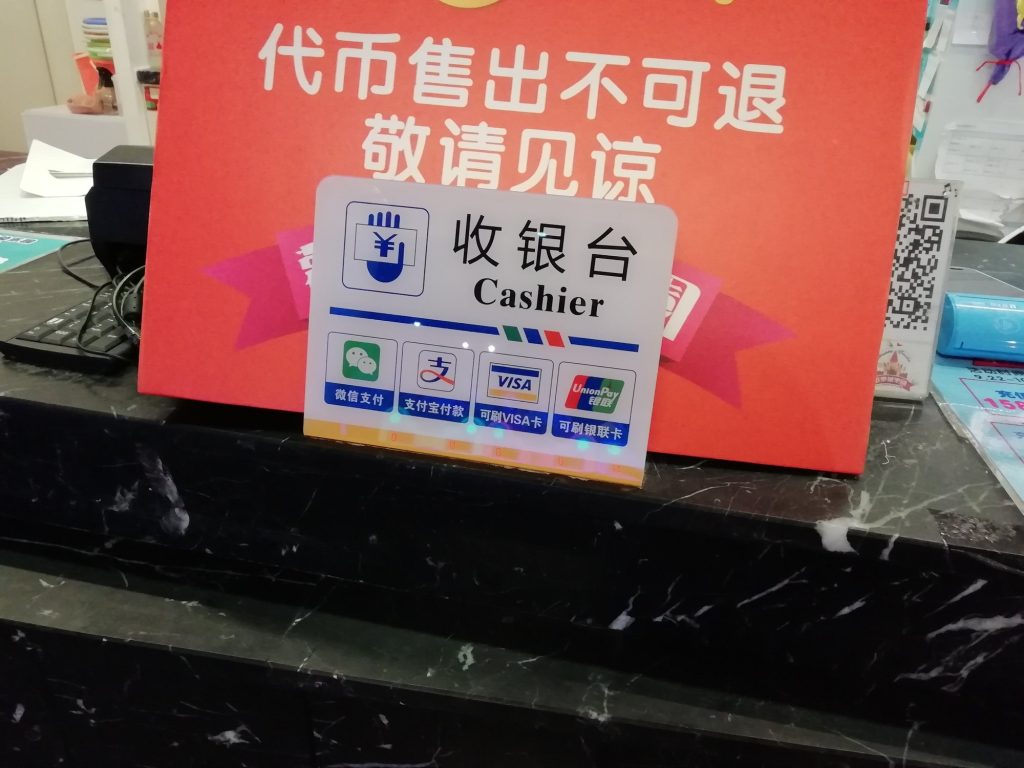
It is not the same as a payment-only QR code by the cashier. Table codes are for ordering; counter codes are for paying. If you scan the wrong one, you may land on a pay screen with no dishes—back up and look for the stand labeled for ordering, often with a table number printed beside the code.
For the payment half of dining in China, keep Alipay and WeChat Pay setup for foreign visitors handy before you sit down hungry.
Before you sit: three phone checks
1. Mobile data or restaurant Wi‑Fi. QR menus need a live connection. If your eSIM or SIM is offline, connect to venue Wi‑Fi (often needs a phone number SMS—another friction point). See our SIM / eSIM notes for visitors if connectivity is still shaky.
2. Camera permission for WeChat, Alipay, or the system camera.
3. Battery. Menus, translations, and payment drains add up. A power bank earns its suitcase weight at dinner.
Optional but helpful: offline translation packs downloaded before you travel, and screenshots of dishes you already know you like.
The standard scan flow
Step 1 — Find the table code
Look for a sticker or acrylic stand on your table. Confirm the table number matches the physical table if staff seated you. Scanning a neighbor’s code can send food to the wrong place—or confuse the kitchen.
Step 2 — Open the scanner
In WeChat: tap Discover → Scan (wording varies by version) or use the scan icon on the main screen.
In Alipay: use the Scan button on the home screen.
Or open the phone’s camera; many Android/iOS cameras offer a link banner when they recognize a QR code.
Step 3 — Authorize if asked
You may be prompted to open in WeChat, allow a mini-program, or grant location. If the prompt is only in Chinese, look for green confirm buttons and avoid anything that looks like a payment authorization until you have built a cart on purpose.
Step 4 — Build the cart
Browse categories (冷菜 cold dishes, 热菜 hot dishes, 主食 staples, 饮料 drinks, 锅底 hotpot bases, and so on). Tap photos, set quantities, add notes if the UI offers a remark box.
Step 5 — Submit
Hit the submit / order / 下单 style button. Some systems send courses immediately; others wait until you confirm. Watch for a success message or order number.
Step 6 — Pay when the system asks
Payment may be required up front (common in busy casual spots) or after eating (more common in some full-service rooms). Follow the on-screen pay button, or ask staff 怎么付钱 (zěnme fù qián — how to pay).
When the menu is Chinese-only
Expect this often. Coping strategies that work in real rooms:
- Photo translate. Screenshot a dish block, then run Google Translate, Apple Live Text, or another OCR translate tool. Translate category headers first so you know you are in “vegetables” not “offal.”
- Trust photos more than poetry. A clear picture of fish-fragrant eggplant beats a poetic mistranslation.
- Use known anchors. If you recognize 米饭 (rice), 鸡蛋 (egg), 豆腐 (tofu), 牛肉 (beef), 鸡肉 (chicken), 猪肉 (pork), 虾 (shrimp), you can filter faster.
- Ask staff to tap for you. Point at a photo on your phone or the shared tablet and say 这个 (zhège — this one). Many servers will add it on their device if your login fails.
- Start with safe categories. Cold cucumbers, tomato-egg, plain rice, and a simple meat stir-fry beat mystery house specials on night one.
If you are exploring regional food on other days—say a Xi’an sandwich counter or Shanghai soup dumplings—remember those venues may still use verbal or paper ordering. QR is dominant in many sit-down restaurants, not universal at every snack window. For sandwich-counter culture, see how to order roujiamo once that guide is live on your reading list; for dumpling caution, see xiaolongbao in Shanghai.
Ordering safely: allergies, spice, and “don’t surprise me”
QR remark boxes are imperfect. If you have an allergy, say it out loud and show a translation note:
- 我对花生过敏 — I am allergic to peanuts.
- 不要辣 — no spicy.
- 我不吃猪肉 — I do not eat pork.
- 清淡一点 — make it milder / lighter.
Spice labels can understate heat, especially in Sichuan and Hunan restaurants. If you are unsure, order one mild dish first, taste, then add. Hotpot QR menus often make you choose a broth base—select a split pot (一半辣一半不辣) when offered so the table can share.
Avoid tapping “chef’s recommendation bundles” blindly; bundles are efficient for locals who know the dishes and risky when translations collapse five items into one vague line.
Common friction points for foreign phones
WeChat mini-program login walls. Some menus insist on WeChat login. If your WeChat is usable, proceed. If not, ask for a paper menu, a staff-held tablet, or ordering by pointing.
Foreign number verification. SMS codes may not arrive on roaming numbers. Try restaurant Wi‑Fi login alternatives or staff help rather than fighting the form at the table.
Region locks or blank pages. Occasionally a page loads empty on non-China app stores’ browser settings. Switch to WeChat’s internal browser via scan, or ask staff to place the order.
Multiple codes on one table. One may be the menu; another a survey, invoice helper, or private-domain marketing page. If the page looks like a mall ad, you scanned the wrong square.
What to do when the code fails
Stay polite and switch channels quickly:
1. Tell staff 扫不了 (sǎo bù liǎo — cannot scan) or show the error screen.
2. Ask 有纸质菜单吗? (yǒu zhǐzhì càidān ma? — is there a paper menu?).
3. Offer to order from their handheld: point at photos in a translation app.
4. Move to another table’s working stand only with staff permission—do not freestyle table numbers.
5. As a last resort, choose a nearby restaurant with a visible picture board or bilingual menu, especially late at night when patience is thin.
Failure is common enough that good restaurants already have a workaround. Your job is to signal the problem early, not apologize for five silent minutes of failed scanning.
Paying, tipping, and leaving
Tipping is generally not expected in mainland Chinese restaurants the way it is in some Western countries. Pay the amount due via the app or at the cashier. If the QR system prepaid, you may simply leave after confirming nothing unpaid remains—glance at the order status or ask 可以走了吗? (kěyǐ zǒu le ma? — can we leave?).
For invoices (fapiao), ask before payment if you need one for work. The process is separate from the tourist receipt habit you may know elsewhere.
Holiday crowds and QR queues
During Mid-Autumn (25–27 September 2026) and National Day Golden Week (1–7 October 2026), popular restaurants may require waits before you even reach a table with a code. Scan culture does not remove queues; it only speeds ordering after you sit. Book ahead when a venue offers booking WeChat mini-programs, or eat slightly earlier than local peak times.
If you are comparing holiday logistics more broadly, our Golden Week versus Mid-Autumn travel note helps you decide which week needs more restaurant patience.
A first-week practice plan
- Meal 1: Scan successfully, order two familiar dishes and rice.
- Meal 2: Use photo translate on one unknown vegetable dish.
- Meal 3: Practice a spoken allergy or no-pork line with staff while using the cart.
- Meal 4: Handle a failure gracefully—paper menu or staff tablet—without abandoning dinner.
By the end of a week, QR menus feel less like a test and more like what they are for locals: a noisy, imperfect, very normal way to get food to a table.
Bottom line
Charge your phone, scan the table code (not a random poster), translate with photos, submit a small first cart, and ask for help the moment the page locks you out. Chinese restaurant QR menus reward calm process over perfect language—and once the flow clicks, dinner stops being a technology standoff and becomes dinner again.