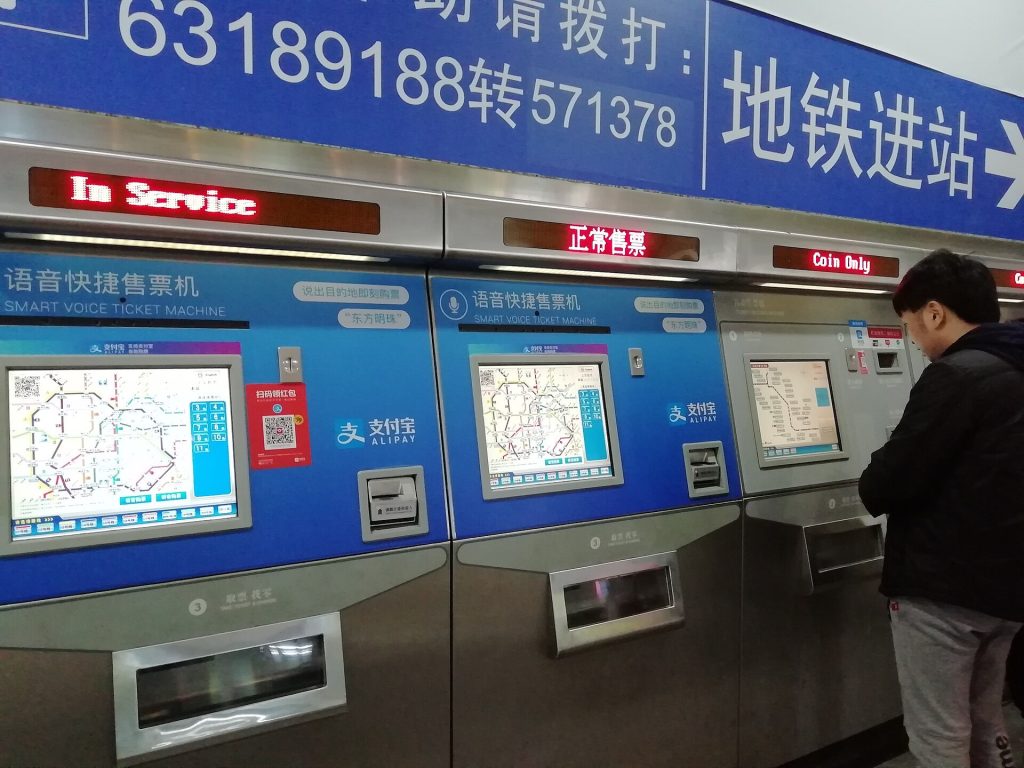
You have a working foreign debit card, and perhaps Apple Pay or a fintech card you have used in other countries. Then a metro ticket machine, a park entrance cabinet, a small supermarket POS, or a hospital window simply refuses it. The sticker on the device shows UnionPay and nothing else. This is not a mystery unique to 2026, and it is not a reason to panic if you have already planned a backup.
This guide is about the moment a shop or machine is UnionPay-only, and the backups that usually still work. It is not a guide to paying with UnionPay QR using a foreign card, which is UnionPay QR with foreign cards. It is not the current status of Apple Pay and Google Pay in Apple Pay / Google Pay status, and it is not a review of Wise or Revolut in Wise, Revolut and other fintech cards in mainland China. Those tools may help on some days and still fail on a machine that only speaks to a UnionPay card rail.
What “UnionPay-only” usually looks like
You may see a single logo on a card slot, a screen that offers bank-card payment and then rejects Visa or Mastercard, or a staff member who says, calmly, that this machine is 银联 only. The pattern appears at some metro and suburban rail ticket machines, some park or museum lockers and ticket cabinets, some older restaurant or pharmacy terminals, and some service windows that never onboarded foreign card schemes.
It does not mean the city has “banned foreign cards.” It means this device, in this place, is wired for a domestic card network. The next machine in the same station, or the human window beside it, may behave differently. Treat each device as its own case.
A card that carries a UnionPay logo—issued by a foreign bank or a fintech, in some cases—sometimes works in these readers and sometimes does not. We will not invent a success rate, a list of banks that always work, or a fee table. If your issuer says the card is UnionPay and the machine still declines, you still need a backup. dynamic currency conversion at ATMs and hotels is worth reading if a device offers to charge you in your home currency; a UnionPay-only machine may not even get that far.
Backups that are more useful than arguing with a screen
Cash remains the most boring backup. A modest float of yuan, taken from an ATM that actually accepts your card, covers many ticket machines that also take notes, many small shops, and some windows. when you still need cash and ATM foreign cards cash guide exist because this moment is still common.
If Alipay or WeChat Pay is already working on your phone with a bound foreign card, try that next, as Alipay and WeChat Pay hub and WeChat Pay vs Alipay for tourists outline. “Already working” matters. A wallet you have never opened, or one still stuck on verification, is not a backup at a gate. If a merchant’s code refuses an overseas-bound wallet, that is a different failure, described in when a merchant refuses a WeChat Pay overseas card; it still points you toward cash or another desk.
Look for a staffed window. Metro stations, railway halls, parks, and many museums still sell tickets or top up cards at a counter. Staff can often take cash even when the cabinet next to them cannot take your chip card. At a shop, ask whether you can pay at another till.
Try another machine before you give up on the whole venue. One cabinet may be UnionPay-only; another, or a newer overhaul, may offer QR payment. Do not loop on the same decline and assume the card is broken everywhere.
If you have a second card that actually includes UnionPay, try it once. If it fails, stop hammering the terminal. Repeated declines can annoy a bank’s fraud system and do not improve the machine.
When mobile data dies and wallets cannot refresh a code, how to pay in China when mobile data dies is the companion piece. A UnionPay-only cabinet plus a dead phone is exactly why a small cash float belongs in a zipped pocket, not only in a screenshot of a balance.
A short sequence at the machine
1. Read the logos and the on-screen payment options before you insert a card.
2. If you already have a working Alipay or WeChat code, try that if the machine or a nearby QR supports it.
3. If the device is card-only and shows UnionPay alone, do not expect a US- or Europe-issued Visa or Mastercard to magically clear.
4. Move to the staff window or to a machine that lists cash or QR.
5. Pay with cash if that is the clean path, and keep the receipt or the token the gate needs.
What not to do
Do not raise your voice at a machine. Do not let a helpful stranger “help” with a payment on their phone in exchange for your cash in an unofficial change deal. Do not assume Apple Pay will save a UnionPay-only slot; Apple Pay / Google Pay status explains why contactless status in China is not the same as at home.
Late December 2026 and New Year 2027 mean more ticket machines at parks and stations, and longer window queues when machines bounce you. Arrive with cash and at least one working wallet already tested on a small purchase, not discovered at a gate. Lovely China orients travellers; we do not certify card networks. Recheck what your own issuer says about UnionPay, and use the backup that actually opens the gate.
Related Lovely China reading
For payments, start with Alipay and WeChat Pay hub and WeChat Pay vs Alipay for tourists. For trains, keep high-speed rail first-timers guide and 12306 passport signup for foreigners handy. City hubs: Beijing first-visit guide, Shanghai first-visit guide. Connectivity: roaming vs local SIM honest guide, pocket Wi-Fi vs eSIM for China, offline maps for foreigners. Bookmark China travel tools page.
Practical checklist
- Confirm official rules on the relevant government, park, airline, or bank page near your travel week
- Screenshot bookings, tickets, and QR codes while you still have stable Wi-Fi
- Save hotel and attraction names in Chinese characters in your phone notes
- Carry passport, a backup payment method, and a small cash float (why cash is still needed)
- Test one small mobile payment before you rely on wallets at a gate or taxi
- Keep the China travel tools page page bookmarked for related Lovely China hubs
FAQ
Will my foreign Visa or Mastercard work in a UnionPay-only machine?
Often no. A device that only lists UnionPay is usually wired for that network. Try a staff window, a machine that offers cash or QR, a working Alipay or WeChat wallet, or a modest cash float rather than repeating the same decline.
Is this the same problem as UnionPay QR or Apple Pay not working?
No. UnionPay QR with a foreign card, and Apple Pay or Google Pay status, are separate questions with their own guides. A UnionPay-only card slot can refuse you even if those other tools work elsewhere in the same city.
Should I buy a special card just in case?
Only if your issuer already offers a card that includes UnionPay and you understand the fees from the issuer itself. We do not invent a bank list or a success rate. Cash and a working mobile wallet remain the practical backups for a single machine.
What if the metro gate is ahead and the machine just rejected my card?
Move to the staffed ticket window or to a cabinet that accepts cash or QR. Do not block a machine in a loop, and do not accept an unofficial ‘helpful’ payment from a stranger.
Notes for late 2026 travellers
Late December 2026 and the New Year week into 2027 bring colder mornings, earlier sunsets, and holiday crowds in many city hubs. Pack real winter layers in the north, and leave extra time on weekends and around 1 January.
This article does not invent ticket prices, opening hours, processing times, consular fees, or official statistics. When a number matters, verify it on the official site, app screen, or ticket board near your travel week.
If an official rule page disagrees with this guide, follow the official page. Lovely China orients English-speaking travellers; we are not an immigration, banking, or medical authority.